
What Can You Do to Improve Your Email Deliverability?
Download the eBookDoes this sound familiar? You’ve sent the campaign. Open rates look thin, replies aren’t coming in, and nobody on your team can tell you why. I’ve been there! The reason was usually buried somewhere in a stack of authentication records, blocklists, and reputation scores. It’s something that most B2B senders never look at until you realize something’s already broken.
There are four groups of email deliverability tools: Authentication, Blocklist and IP Reputation, Sender Score, and Inbox Placement and List Hygiene. If you’re in a hurry, submit your domain to the MXToolBox website and review the report. It’s an SPF, DKIM, and DMARC checker that generates immediate data.
The next rapid results step is to do a GlockApps seed-list test, which will take about 48 hours but will deliver a broad range of deliverability information. Do these two things and you’ll be off to a rapid start to resolving your email challenges.
If you have the time and wish to complete a comprehensive audit with email deliverability tools, read on. As a marketing team leader or executive in your company, this is a must. The information you need is laid out below.
Our Email Deliverability Checklist
The fact is that email deliverability tools aren’t a single product you buy and forget. They’re something holistic, a workflow, a sequence of checks that runs from your domain’s authentication setup all the way through to the moment your message lands in someone’s inbox. Skip a stage, and the tools that check the others will only tell you part of the story.
The workflow breaks down into four stages: verifying your authentication records, monitoring your blocklist and IP reputation, reading your sender score correctly, and testing actual inbox placement before you send. Each one catches a different failure point, and each one needs its own tool—or, in some cases, the same tool but a different approach.
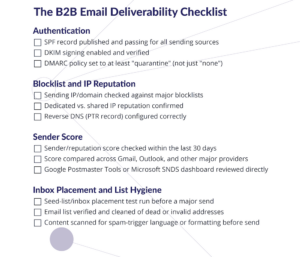
To make this easier to act on rather than just read, I had Purposeful Media Promotions create a companion email deliverability checklist covering all four stages in one page. Pull it up alongside this post, or come back to it before your next campaign send.
Click on the Checklist to Download and Use It
How Do You Verify SPF DKIM and DMARC Records?
Now more than ever, authentication is the foundation everything else sits on. If a mailbox provider can’t confirm your domain actually sent the message, none of the other deliverability work matters. That’s because you’re already flagged before your content or reputation is even considered. An SPF DKIM DMARC checker is the first email deliverability tool you need.
What Does Each Authentication Record Actually Check?
SPF (Sender Policy Framework) tells receiving servers which IP addresses are allowed to send mail on your domain’s behalf. DKIM (DomainKeys Identified Mail) adds a cryptographic signature to each message, proving it wasn’t altered in transit. DMARC (Domain-based Message Authentication, Reporting, and Conformance) ties the two together and tells receiving servers what to do when a message fails either check: reject it, quarantine it, or let it through and just report the failure.
A domain with SPF and DKIM in place but without a proper DMARC policy is still exposed. You’re collecting data on failures without actually stopping any of them.
Which Tools Audit DNS and Authentication Setup?
Use MXToolbox to get a fast, single-screen read on all three records at once, which is usually enough for a routine check. The outcome will be clear. If you’re stuck with your DMARC record specifically—parsing the aggregate reports, or figuring out why your policy isn’t tightening the way you expected—a purpose-built tool like dmarcian goes deeper if you’re looking for an enterprise-grade solution.
How Do You Know If You’re Blocklisted or Losing IP Reputation?
Passing authentication doesn’t guarantee a clean landing. The next layer of email deliverability tools audits your domain reputation. Reputation lives on top of authentication, and it’s tracked separately by every major mailbox provider and a long list of independent blocklist operators.
What Is IP and Domain Reputation Monitoring?
Reputation monitoring answers a narrower question than a sender score does: is your sending IP or domain currently flagged by name on any blocklist, and is your standing with a given provider trending up or down? A domain can have solid authentication and still land in spam if its IP has picked up a poor sending history. If you operate with shared IP ranges, you’re especially exposed to this, since one bad sender on the same range can drag reputation down for everyone on it.
Which Tools Offer an Email Blocklist Checker?
The same DNS-checking email deliverability tools that verify SPF/DKIM/DMARC, like MXToolbox, typically run blocklist checks in the same pass. If you’re sending primarily through Outlook or Exchange, Microsoft’s own SNDS dashboard adds a layer those third-party tools can’t: direct traffic and complaint-rate data from Microsoft itself, rather than an inferred read from the outside.
What Does Your Sender Score Mean and Does It Differ by Provider?
Your Sender Score gets to the heart of the gap. The question you need email deliverability tools to answer here is what the sender score number tells you to do next.
What Is a Sender Score, in Plain English?
A sender or reputation score is a mailbox provider’s shorthand for how trustworthy your sending pattern has looked recently. Bounce rates, complaint rates, spam-trap hits, and engagement all feed into it. A high score isn’t a guarantee of inbox placement, and a dip isn’t automatically a crisis. It’s a signal to look at what changed in your sending behavior over the same window.
How Do Gmail and Outlook Score You Differently?
ISP scoring isn’t universal, and that’s where a lot of senders get tripped up. Google Postmaster Tools gives you Gmail’s read on your domain directly from the source, and Microsoft SNDS does the same for Outlook and Exchange. It’s entirely possible to look healthy on one and be quietly degrading on the other. I’ve seen a GlockApps seed-list report show exactly that split, Gmail placement holding steady while Outlook placement dropped over the same send, with nothing in the sender’s own metrics flagging it until the report laid the two side by side.
How Do You Test Inbox Placement Before You Send?
Everything up to this point tells you whether you’re set up correctly. This stage tells you whether it’s actually working.
How GlockApps Uncovers Inbox Placement Problems Standard Metrics Miss
Seed-list testing sends your message to a set of real mailboxes across major providers and reports back where it actually landed, i.e., inbox, promotions, or spam, before you send to your full list. I’ve noticed this with clients more than once where the tougher conversation wasn’t technical at all. The issue was getting team buy-in to add the tracking snippet and seed list to a live campaign in the first place.
Once the configuration hurdle clears, though, the placement data is often the first time a client sees deliverability as something measurable rather than a vague complaint about “emails not showing up.” For enterprise-scale sending with multiple brands or a larger volume of ongoing campaigns, a tool like Validity Everest extends the same idea with broader competitive benchmarking.
Cleaning Your List First
Inbox placement testing works best on a list that’s already been verified. Dead addresses, spam traps, and catch-all domains all drag down the exact metrics you’re trying to protect. A list-cleaning pass (the kind tools like ZeroBounce are built for) belongs before the seed-list test, not after.
Conclusion
Deliverability isn’t a single fix. It’s a workflow you revisit every time your sending patterns, list, or content change. Authentication gets you in the door. Reputation and sender score tell you how you’re trending. Inbox placement testing tells you what’s actually happening right now. Skip any one stage, and you’re diagnosing with half the picture.
The checklist above gives you a way to run through all four stages in one pass. If you want to go deeper on the authentication layer specifically—where B2B senders most often get SPF, DKIM, and DMARC wrong—that’s exactly what we cover next.

Before You Spend Another Dollar on Email Marketing is a practical guide for B2B owners and executives who want to know whether their emails are actually reaching the inbox. It covers the email deliverability tools for authentication and reputation that will position your campaigns for engagement and success. Then it explains how your ISP distribution report serves as a monthly health check, and how to interpret your audit results, whether your foundation is solid or needs work.